Enhanced Advanced Filters Search on Sales Window

Date:
31/10/25
Page:
Sales/Royalties > Sales > Advanced Filters
Details:
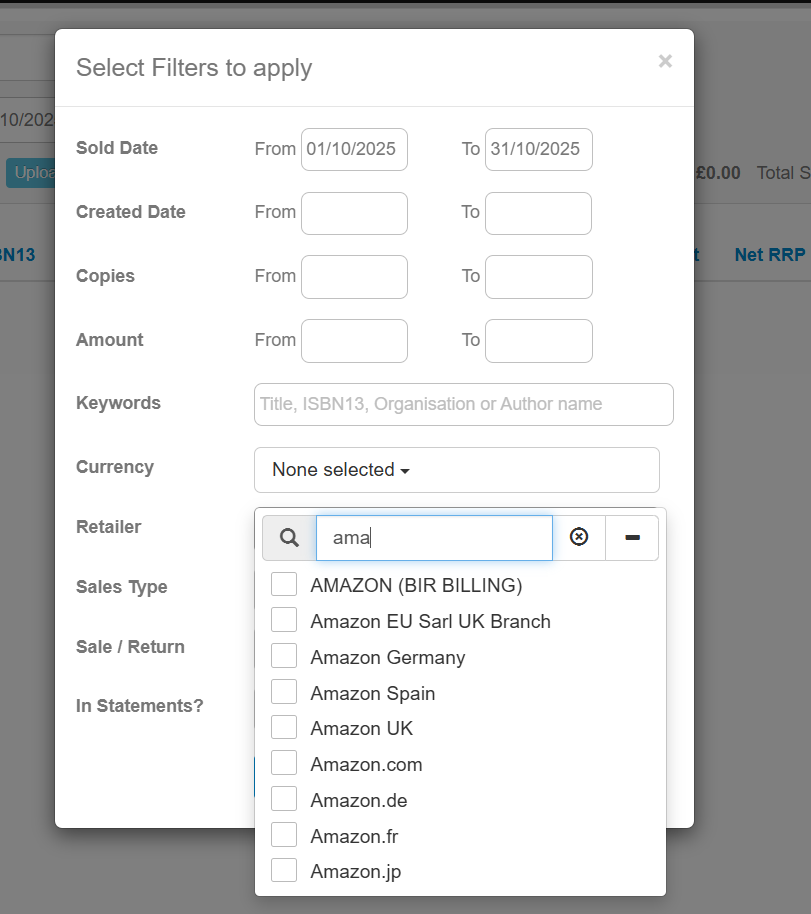
Once you have uploaded your sales to the system, you can search for sales lines in multiple different ways. One option is to use the Advanced Filters button at the top of the main sales screen. This function allows you to filter your sales window by currency, retailer, sales type and so on, or look for sales uploaded or sold within a specific date range.
We have improved the Advanced Filters function by allowing you to search for a specific result in each field. For example, when opening the Retailer dropdown menu, you can now directly search for a retailer instead of scrolling through the list. This list will only populate once you have typed in three characters, which prevents loading problems for publishers that have a large amount of retailers logged within their system.
Please sign in to leave a comment.
Comments
0 comments